1.1 Programming language
Two kinds of programs process high-level languages into low-level languages: interpreters and compilers. An interpreter reads a high-level program and executes it, meaning that it does what the program says. It processes the program a little at a time, alternately reading lines and performing computations. Figure 1.1 shows the structure of an interpreter.
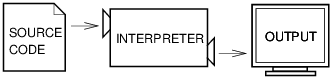
| Figure 1.1: An interpreter processes the program a little at a time, alternately reading lines and performing computations. |
A compiler reads the program and translates it completely before the program starts running. In this context, the high-level program is called the source code, and the translated program is called the object code or the executable. Once a program is compiled, you can execute it repeatedly without further translation. Figure 1.2 shows the structure of a compiler.

| Figure 1.2: A compiler translates source code into object code, which is run by a hardware executor. |
Python is considered an interpreted language because Python programs are executed by an interpreter. There are two ways to use the interpreter: interactive mode and script mode. In interactive mode, you type Python programs and the interpreter displays the result:
>>> 1 + 1
2
The chevron, >>>, is the prompt the interpreter uses to indicate that it is ready. If you type 1 + 1, the interpreter replies 2.
Alternatively, you can store code in a file and use the interpreter to execute the contents of the file, which is called a script. By convention, Python scripts have names that end with .py.
To execute the script, you have to tell the interpreter the name of the file. If you have a script named dinsdale.py and you are working in a UNIX command window, you type python dinsdale.py. In other development environments, the details of executing scripts are different. You can find instructions for your environment at the Python website http://python.org.
Working in interactive mode is convenient for testing small pieces of code because you can type and execute them immediately. But for anything more than a few lines, you should save your code as a script so you can modify and execute it in the future.
1.2 What is a program?
A program is a sequence of instructions that specifies how to perform a computation. The computation might be something mathematical, such as solving a system of equations or finding the roots of a polynomial, but it can also be a symbolic computation, such as searching and replacing text in a document or (strangely enough) compiling a program.
The details look different in different languages, but a few basic instructions appear in just about every language:
input:Get data from the keyboard, a file, or some other device.
output:Display data on the screen or send data to a file or other device.
math:Perform basic mathematical operations like addition and multiplication.
conditional execution:Check for certain conditions and execute the appropriate code.
repetition:Perform some action repeatedly, usually with some variation.
1.3 What is debugging?
Programming is error-prone. For whimsical reasons, programming errors are called bugs and the process of tracking them down is called debugging.
Three kinds of errors can occur in a program: syntax errors, runtime errors, and semantic errors. It is useful to distinguish between them in order to track them down more quickly.
1.3.1 Syntax errors
Python can only execute a program if the syntax is correct; otherwise, the interpreter displays an error message. Syntax refers to the structure of a program and the rules about that structure. For example, parentheses have to come in matching pairs, so (1 + 2) is legal, but 8) is a syntax error.
1.3.2 Runtime errors
The second type of error is a runtime error, so called because the error does not appear until after the program has started running. These errors are also called exceptions because they usually indicate that something exceptional (and bad) has happened.
Runtime errors are rare in the simple programs you will see in the first few chapters, so it might be a while before you encounter one.
1.3.3 Semantic errors
The third type of error is the semantic error. If there is a semantic error in your program, it will run successfully in the sense that the computer will not generate any error messages, but it will not do the right thing. It will do something else. Specifically, it will do what you told it to do.
The problem is that the program you wrote is not the program you wanted to write. The meaning of the program (its semantics) is wrong. Identifying semantic errors can be tricky because it requires you to work backward by looking at the output of the program and trying to figure out what it is doing.
1.3.4 Experimental debugging
One of the most important skills you will acquire is debugging. Although it can be frustrating, debugging is one of the most intellectually rich, challenging, and interesting parts of programming.
In some ways, debugging is like detective work. You are confronted with clues, and you have to infer the processes and events that led to the results you see.
Debugging is also like an experimental science. Once you have an idea about what is going wrong, you modify your program and try again.
1.4 Formal and natural languages
Natural languages are the languages people speak, such as English, Spanish, and French. They were not designed by people (although people try to impose some order on them); they evolved naturally.
Formal languages are languages that are designed by people for specific applications. For example, the notation that mathematicians use is a formal language that is particularly good at denoting relationships among numbers and symbols. Chemists use a formal language to represent the chemical structure of molecules. And most importantly:
Programming languages are formal languages that have been designed to express computations.
1.5 Debugging
It is a good idea to read this book in front of a computer so you can try out the examples as you go. You can run most of the examples in interactive mode, but if you put the code in a script, it is easier to try out variations.
Whenever you are experimenting with a new feature, you should try to make mistakes. For example, in the “Hello, world!” program, what happens if you leave out one of the quotation marks? What if you leave out both? What if you spell print wrong?
This kind of experiment helps you remember what you read; it also helps with debugging, because you get to know what the error messages mean. It is better to make mistakes now and on purpose than later and accidentally.
Programming, and especially debugging, sometimes brings out strong emotions. If you are struggling with a difficult bug, you might feel angry, despondent or embarrassed.
1.7 Glossary
problem solving:The process of formulating a problem, finding a solution, and expressing the solution.
high-level language:A programming language like Python that is designed to be easy for humans to read and write.
low-level language:A programming language that is designed to be easy for a computer to execute; also called “machine language” or “assembly language.”
portability:A property of a program that can run on more than one kind of computer.
interpret:To execute a program in a high-level language by translating it one line at a time.
compile:To translate a program written in a high-level language into a low-level language all at once, in preparation for later execution.
source code:A program in a high-level language before being compiled.
object code:The output of the compiler after it translates the program.
executable:Another name for object code that is ready to be executed.
prompt:Characters displayed by the interpreter to indicate that it is ready to take input from the user.
script:A program stored in a file (usually one that will be interpreted).
interactive mode:A way of using the Python interpreter by typing commands and expressions at the prompt.
script mode:A way of using the Python interpreter to read and execute statements in a script.
program:A set of instructions that specifies a computation.
algorithm:A general process for solving a category of problems.
bug:An error in a program.
debugging:The process of finding and removing any of the three kinds of programming errors.
syntax:The structure of a program.
syntax error:An error in a program that makes it impossible to parse (and therefore impossible to interpret).
exception:An error that is detected while the program is running.
semantics:The meaning of a program.
semantic error:An error in a program that makes it do something other than what the programmer intended.
natural language:Any one of the languages that people speak that evolved naturally.
formal language:Any one of the languages that people have designed for specific purposes, such as representing mathematical ideas or computer programs; all programming languages are formal languages.
token:One of the basic elements of the syntactic structure of a program, analogous to a word in a natural language.
parse:To examine a program and analyze the syntactic structure.
print statement:An instruction that causes the Python interpreter to display a value on the screen.
 Technical English